Wednesday, November 1, 2017
Open Python ver. 3.6 from cmd line on Windows
If you want to open up Python ver. 3.6 or any other versions from command line on Windows system. Do the following:
👀
If you have a different version of python install, just replace 3.6 with that version.

- Go to Start menu > type cmd in the search box>Press ENTER
- In the command prompt type py -3.6
- Press ENTER
👀
If you have a different version of python install, just replace 3.6 with that version.

Friday, October 27, 2017
Querying with Transact-SQL_F2
1. Get the order ID and unit price for each order by joining the Orders table and the Order Details table.
2. Get the order ID and first name of the associated employee by joining the Orders and Employees tables.
3. Get the employee ID and related territory description for each territory an employee is in, by joining the Employees, EmployeeTerritories and Territories tables.
4. Select all the different countries from the Customers table and the Suppliers table using UNION.
5. Select all the countries, including duplicates, from the Customers table and the Suppliers table using UNION ALL.
6. Using the Products table, get the unit price of each product, rounded to the nearest dollar.
7. Using the Products table, get the total number of units in stock across all products.
8. Using the Orders table, get the order ID and year of the order by using YEAR(). Alias the year as OrderYear.
9. Using the Orders table, get the order ID and month of the order by using DATENAME(). Alias the month as OrderMonth.
10. Use LEFT() to get the first two letters of each region description from the Region table.
2. Get the order ID and first name of the associated employee by joining the Orders and Employees tables.
3. Get the employee ID and related territory description for each territory an employee is in, by joining the Employees, EmployeeTerritories and Territories tables.
4. Select all the different countries from the Customers table and the Suppliers table using UNION.
5. Select all the countries, including duplicates, from the Customers table and the Suppliers table using UNION ALL.
6. Using the Products table, get the unit price of each product, rounded to the nearest dollar.
7. Using the Products table, get the total number of units in stock across all products.
8. Using the Orders table, get the order ID and year of the order by using YEAR(). Alias the year as OrderYear.
9. Using the Orders table, get the order ID and month of the order by using DATENAME(). Alias the month as OrderMonth.
10. Use LEFT() to get the first two letters of each region description from the Region table.
Tuesday, October 17, 2017
Weather Observation Station 3
Problem:
Query a list of CITY names from STATION with even ID numbers only. You may print the results in any order, but must exclude duplicates from your answer.
Input Format
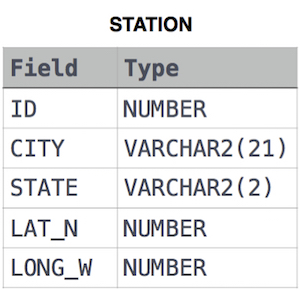
The STATION table is described as follows:

where LAT_N is the northern latitude and LONG_W is the western longitude.
Sunday, October 15, 2017
Querying with Transact-SQL_F1 Raw
Q1. Select the quantity per unit for all products in the Products table.
Q2.Select the unique category IDs from the Products table.
Q3. Select the names of products from the Products table which have more than 20 units left in stock.
Q4. Select the product ID, product name, and unit price of the 10 most expensive products from the
Q5. Select the product ID, product name, and quantity per unit for all products in the Products table.
Q6. Select the product ID, product name, and unit price of all products in the Products table. Sort your results by number of units in stock, from greatest to least.
Skip the first 10 results and get the next 5 after that
7. Use STR and CONVERT where appropriate to display the first name, employee ID and birthdate (in ISO 8601 format) for each employee in the Employees table.
Each result should be a single string in the following format, where each <<value>> is replaced by the appropriately converted value:
<<FirstName>> has an EmployeeID of <<EmployeeID>> and was born <<BirthDate>>
Q8. Select from the Orders table.
The first column of your result should be a single string in exactly the following format:
<<ShipName>> is from <<ShipCity or ShipRegion or ShipCountry>>
If there is no ShipCity, then you should select ShipRegion, and if there is no ShipRegion you should select ShipCountry.
Q9. Select the ship name and ship postal code from the Orders table. If the postal code is missing, display 'unknown'.
Q10. Using the Suppliers table, select the company name, and use a simple CASE expression to display 'outdated' if the company has a fax number, or 'modern' if it doesn't. Alias the result of the CASE expression to Status.
Q2.Select the unique category IDs from the Products table.
Q3. Select the names of products from the Products table which have more than 20 units left in stock.
Q4. Select the product ID, product name, and unit price of the 10 most expensive products from the
Q5. Select the product ID, product name, and quantity per unit for all products in the Products table.
Q6. Select the product ID, product name, and unit price of all products in the Products table. Sort your results by number of units in stock, from greatest to least.
Skip the first 10 results and get the next 5 after that
7. Use STR and CONVERT where appropriate to display the first name, employee ID and birthdate (in ISO 8601 format) for each employee in the Employees table.
Each result should be a single string in the following format, where each <<value>> is replaced by the appropriately converted value:
<<FirstName>> has an EmployeeID of <<EmployeeID>> and was born <<BirthDate>>
Q8. Select from the Orders table.
The first column of your result should be a single string in exactly the following format:
<<ShipName>> is from <<ShipCity or ShipRegion or ShipCountry>>
If there is no ShipCity, then you should select ShipRegion, and if there is no ShipRegion you should select ShipCountry.
Q9. Select the ship name and ship postal code from the Orders table. If the postal code is missing, display 'unknown'.
Q10. Using the Suppliers table, select the company name, and use a simple CASE expression to display 'outdated' if the company has a fax number, or 'modern' if it doesn't. Alias the result of the CASE expression to Status.
Friday, October 6, 2017
Weather Observation Station 10 HackerRank
Query the list of CITY names from STATION that do not end with vowels. Your result cannot contain duplicates.
Input Format
The STATION table is described as follows:

Works on MS SQL SERVER
Congratulations, you passed the sample test case.
Click the Submit Code button to run you code against all the test cases.
Your Output (stdout)
Addison
Agency
Alanson
Albany
Albion
Algonac
Allerton
Alton
Andover
Tuesday, October 3, 2017
Learning Transact-SQL exercise 1
Introduction to Transact-SQL
AdventureWorks Cycles is a company that sells directly to retailers, who then sell products to consumers. Each retailer that is an AdventureWorks customer has provided a named contact for all communication from AdventureWorks.
The sales manager at AdventureWorks has asked you to generate some reports containing details of the company's customers to support a direct sales campaign. Let's start with some basic exploration.
Instructions
Familiarize yourself with the
Customer table by writing a Transact-SQL query that retrieves all columns for all customers.
Solution:👀
Create List of Customer Contacts
As a next step, it would be good to have a structured view of the names of your customer contacts.
Create a table that lists all customer contact names. The table should include
the
Title,FirstName,MiddleName,LastNamandSuffixof all customers.Solution:👀
| Title | firstname | middlename | lastname | suffix |
|---|---|---|---|---|
| Mr. | Orlando | N. | Gee | null |
| Mr. | Keith | null | Harris | null |
| Ms. | Donna | F. | Carreras | null |
| Ms. | Janet | M. | Gates | null |
Create List of Customer Contacts (2)
Each customer has an assigned salesperson. Can you finish the query to include the salesperson and a nicely structured display of the customers' names?
- Complete the query to list the following elements for all customers:The salesperson
- A column named
CustomerName that displays how the customer contact should be greeted (e.g. "Mr Smith").
- The customer's phone number (
Phone)
- Don't forget to space out the contents of your
CustomerName column with + ' ' + and use the alias provided.
CustomerName that displays how the customer contact should be greeted (e.g. "Mr Smith").Phone)CustomerName column with + ' ' + and use the alias provided.Solution:👀
| Salesperson | CustomerName | Phone |
|---|---|---|
| adventure-works\pamela0 | Mr. Gee | 245-555-0173 |
| adventure-works\david8 | Mr. Harris | 170-555-0127 |
| adventure-works\jillian0 | Ms. Carreras | 279-555-0130 |
| adventure-works\jillian0 | Ms. Gates | 710-555-0173 |
| adventure-works\shu0 | Mr. Harrington | 828-555-0186 |
| adventure-works\linda3 | Ms. Carroll | 244-555-0112 |
Retrieving Customer and Sales Data
if you want to build a string with an integer (e.g.
id) you can use:CAST(id AS VARCHAR)
Provide a list of all customer companies in the format
<Customer ID>: <Company Name> (e.g. 78: Preferred Bikes). You'll need to use both CAST() and VARCHAR in your solution. Don't forget to use the alias provided.Solution:👀
| CustomerCompany |
|---|
| 1: A Bike Store |
| 2: Progressive Sports |
| 3: Advanced Bike Components |
| 4: Modular Cycle Systems |
| 5: Metropolitan Sports Supply |
Retrieving Customer and Sales Data (2)
The
SalesLT.SalesOrderHeader table contains records of sales orders. You have been asked to retrieve data for a report that shows:- The sales order number and revision number in the format
<Order Number> (<Revision>)(e.g.SO71774 (2)). - The order date converted to ANSI standard format
yyyy.mm.dd(e.g.2015.01.31).
| OrderRevision | OrderDate |
|---|---|
| SO71774 (1) | 2004.06.01 |
| SO71776 (1) | 2004.06.01 |
| SO71780 (1) | 2004.06.01 |
| SO71782 (1) | 2004.06.01 |
| SO71783 (1) | 2004.06.01 |
Retrieving Customer Contact Names
In this exercise, you'll write a query that returns a list of customer names.
The list should consist of a single field in the format:
<first name> <last name>(e.g. Keith Harris) if the middle name is unknown,<first name> <middle name> <last name>(e.g. Jane M. Gates) if a middle name is stored in the database.
| CustomerName |
|---|
| Orlando N. Gee |
| Keith Harris |
| Donna F. Carreras |
| Janet M. Gates |
| Lucy Harrington |
Retrieving Primary Contact Details
Customers may provide AdventureWorks with an email address, a phone number, or both. If an email address is available, then it should be used as the primary contact method; if not, then the phone number should be used.
Here, you will write a query that returns a list of customer IDs in one column, and a second column named
PrimaryContact that contains the email address if known, and otherwise the phone number.
Note: In the sample data provided in
AdventureWorksLT, there are no customer records without an email address. Therefore, to verify that your query works as expected, we have run the following UPDATE statement to remove some existing email addresses before you write your query. (Don't worry, you'll learn about UPDATE statements later in the course!)UPDATE SalesLT.Customer
SET EmailAddress = NULL
WHERE CustomerID % 7 = 1;
Write a query that returns a list of customer IDs in one column, and a second column called PrimaryContact that contains the email address if known, and otherwise the phone number.Solution:👀
| CustomerID | PrimaryContact |
|---|---|
| 1 | 245-555-0173 |
| 2 | keith0@adventure-works.com |
| 3 | donna0@adventure-works.com |
| 4 | janet1@adventure-works.com |
| 5 | lucy0@adventure-works.com |
Retrieving Shipping Status
You have been asked to create a query that returns a list of sales order IDs and order dates with a column namedShippingStatus that contains the text "Shipped" for orders with a known ship date, and "Awaiting Shipment" for orders with no ship date.
Note: In the sample data provided in
AdventureWorksLT, there are no SalesOrderHeader records without a ship date. Therefore, to verify that your query works as expected, we have run the following UPDATE statement to remove some existing ship dates before you write your query. (Again, don't worry, you'll learn about UPDATEstatements later in the course!)UPDATE SalesLT.SalesOrderHeader SET ShipDate = NULL WHERE SalesOrderID > 71899;
Write a query to list sales order IDs and order dates with a column named
ShippingStatus that contains the text 'Shipped' for orders with a known ship date, and 'Awaiting Shipment' for orders with no ship dateSolution:👀
| SalesOrderID | OrderDate | ShippingStatus |
|---|---|---|
| 71774 | 2004-06-01 00:00:00 | Shipped |
| 71776 | 2004-06-01 00:00:00 | Shipped |
| 71780 | 2004-06-01 00:00:00 | Shipped |
| 71782 | 2004-06-01 00:00:00 | Shipped |
| 71783 | 2004-06-01 00:00:00 | Shipped |
Sunday, May 14, 2017
Using environment from YAML file in Andconda command prompt (Windows)
This post is to help me remember how to create an enviroment using YAML file using Anaconda command prompt in Windows 10.
Step1: Save the YAML file to the Anaconda envs folder to your computer.
C:\Users\avi\Anaconda3\envs
In this example I have saved the file name dand-env-win.yaml
![]() |
| dand-env-win.yaml |
Step 2: Open Anaconda commant prompt and type conda create -n dand-env-win
the file will be saved to C:\Users\avi\Anaconda3\envs path
Type y to proceed
Step 3: To active the environment type activate dand-env-win
Now, we can go ahead and install any required packages, they will be installed to this environment, by using the following command conda install python=2.7 (or python=3) pandas numpy matplotlib seaborn
Type y to proceed
Subscribe to:
Posts (Atom)